
A2A protocol vs MCP: what each one connects
For agent builders4 min read

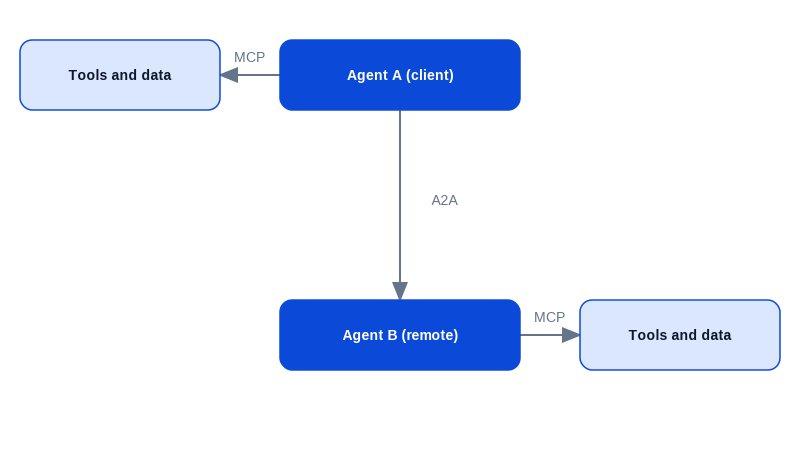
The A2A protocol vs MCP question has a short answer: they solve different problems and are meant to be used together. MCP connects an agent to tools and data. A2A connects one agent to another, including agents built on different frameworks by different vendors. This post sets the two side by side and lists the A2A concepts you will meet first.
A2A protocol vs MCP: the short version
The A2A project describes its protocol as an open standard for communication and collaboration between AI agents. Agents can delegate sub-tasks, exchange information and coordinate actions without exposing their internal memory, tools or logic.
The same page states the relation to MCP directly: the protocols are complementary. MCP gives one agent the tools it needs, and A2A lets that agent work with remote agents. It also says what A2A is not: it is not a sub-agent or tool-call protocol, it does not replace MCP, and it is not an agent development kit.
Source: A2A protocol overview(opens in a new tab)
Concepts in A2A
| Concept | Meaning |
|---|---|
| A2A client | The app or agent that starts the conversation for a user |
| A2A server | The remote agent, exposed over HTTP; a black box to the client |
| Agent Card | A JSON profile with identity, endpoint, capabilities, skills and auth needs |
| Task | A stateful unit of work with its own ID and lifecycle |
| Message | One turn, with a role of user or agent |
| Part | A content container: text, a file or structured data |
| Artifact | A concrete output of a task, such as a document |
| Context ID | Server-issued ID that groups related tasks |
Source: A2A key concepts(opens in a new tab)
Because the server is a black box, the client does not need to know which framework or model sits behind it. It reads the Agent Card to decide whether the agent is useful and how to connect.
How a call travels
According to the key concepts page, communication uses HTTP or HTTPS and the payloads are JSON-RPC 2.0. A client can poll a task for its status, receive streamed updates over server-sent events, or get a webhook callback when the task changes. Long jobs fit this model, since a task has its own life and does not have to finish inside one request.
The AgentOven docs show the same ideas in a concrete form. A task is sent to an agent endpoint with a tasks/send method, or tasks/sendSubscribe to stream, and the task moves through the states submitted, working, completed, failed and canceled. These names come from that project's docs, so check the A2A specification for your version before you rely on them.
Source: A2A in AgentOven (docs)(opens in a new tab)
Which one do you need?
| You want to | Reach for |
|---|---|
| Let your agent read files, query a database or call an API | MCP |
| Let your agent hand a sub-task to an agent someone else runs | A2A |
| Publish your own agent so others can call it | A2A, with an Agent Card |
| Expose a company tool to many AI apps | MCP |
A common layout uses both. A planning agent receives a request, uses A2A to delegate research to a specialist agent, and each agent uses MCP servers for its own data and tools.
A worked scenario
A travel planning agent receives a request for a three day trip. It uses MCP servers for a calendar and a maps service, which are tools and data. It then needs flight prices, which a separate booking agent owns. It reads that agent's card, sees a skill that matches, and sends it a task. The booking agent works on the task, possibly across several turns, and returns an artifact with the options. The planning agent never sees how the booking agent found them.
That split explains why one protocol cannot cover both. Calling a tool is one request with one answer. Delegating to an agent may take minutes, produce partial results and need follow-up questions.
What to test
- Does the Agent Card describe the real behavior, or only the marketing?
- What happens when a remote task fails halfway? Is the failure visible to the client?
- Which data crosses the boundary? The point of the black box is that internals stay private, so check that your messages carry nothing they should not.
- How do you authenticate callers? The card lists auth requirements; read what yours says.
Write down the failure cases for delegation before you ship. What should the client do when the remote agent never answers, when it asks for more input, or when it returns an artifact the client cannot read? Each needs a timeout, a retry rule or a human fallback.
Both protocols are young and still changing. Pin versions, read the specification page for the one you adopt, and keep a small test that calls your agent end to end.