
How to read instructions and long guidelines quickly for AI training work
For experts4 min read
Knowing how to read instructions well is the main skill in this work. A long guideline can run to dozens of pages, and the people who do well on a project are usually the ones who read it best. This post gives you a four-pass method for reading quickly and keeping every rule in your head while you work.
Why how to read instructions is the main skill
In most AI training work, the tasks are not hard to understand but the rules are many. Tone, length, safety limits, formatting, what to do with unclear prompts. Reviewers mark you against the guideline, not against your own taste, so a rule you missed is a mark you lost.
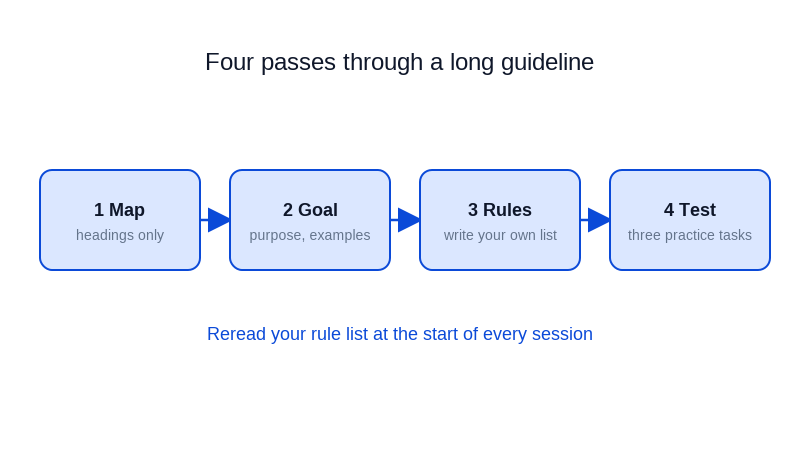
Pass one: the map
Spend five minutes on the headings only. Note the sections: purpose, task steps, rules, edge cases, examples, scoring. You are building a map so that you know where to look later. Do not read details yet.
Pass two: the goal and the examples
Read the purpose and the worked examples. Examples tell you more than rules, because they show how the rules apply. If the guideline gives a good and a bad answer, write one line on why each is good or bad.
Pass three: the rules, with a pen
- Read each rule once, then write it in your own words in one line.
- Mark rules that have exceptions with a star.
- Group rules under four heads: format, content, tone, safety.
- Write the question each rule answers, such as How long? or Which source?
- Count your rules. A list of 20 to 30 is typical, and you can hold it with practice.
Pass four: test yourself
Do three practice tasks and, for each, check your answer against your list. Where you break a rule, return to the original text and read that part again. The aim is to find holes now, while errors are free.
A rule list template
| Rule group | Example line |
|---|---|
| Format | One paragraph, no bullets, max 120 words |
| Content | Cite a source for each claim |
| Tone | Neutral, no advice to the reader |
| Safety | Decline requests for X, mark as Y |
| Unclear cases | If the prompt is vague, pick the most likely meaning and note it |
Your list should be short enough to keep in sight during tasks. Pin it beside your screen or keep it in a second window.
Handling changes
Guidelines change. Projects add rules, correct examples and drop old ones. When you see an update notice, do not skim it. Read what changed and update your list. Note the date of the version you are using in your log, so that if a reviewer marks something wrong you can check which version applied.
Reading speed and accuracy
- Read the hard parts slowly and the repeated parts fast.
- Do not read when tired. An hour of rest beats an hour of rereading.
- Read aloud the sentences that confuse you.
- Use a ruler or finger to hold your place on a dense page.
- Stop and ask if two rules seem to conflict.
Asking good questions
When the guideline is unclear, a good question names the section, quotes the text, gives the case and states your reading. For example: Section 4.2 says to answer in one paragraph. This prompt has two parts. May I write one paragraph per part? A project lead can answer that in seconds.
Common reading mistakes
- Skipping the examples because the rules seem clear.
- Remembering the first version of a rule after it changed.
- Reading to be done instead of reading to use.
- Assuming common sense fills the gaps. The guideline decides, not your instinct.
Worked example
Take a rule such as: answers must be neutral, cite one source, and stay under 120 words. Your note reads: neutral, one source, 120 words. Then add your own check: does my answer give an opinion, does it have a source, and have I counted the words? Three yes or no questions are quicker to apply than the original sentence, and they stop you from drifting.
A habit for every session
Spend two minutes at the start of each session rereading your rule list. It looks like a waste, but it is the cheapest quality check you have. If you want a practice ground, create a free account at curatrain.com/login and read the test instructions as closely as you would a project guideline. Tests there are graded, every score is kept, and you see your result when you finish.